IPTV Service: What You Get After You Subscribe and How to Judge It
An IPTV service is more than a channel count: it is the streams, the servers behind them, the TV guide, catch-up, support and renewals. This guide shows what you get after you subscribe and how to judge the quality yourself.
An IPTV service is what runs behind your login once you have paid: the live channels and on-demand library, the servers that send them to your screen, the TV guide, catch-up and the people who answer when something goes wrong. Its quality shows in how steady the picture stays at busy hours and how quickly problems get fixed.
Most buying advice stops at the checkout. This guide starts there. It walks through what a working service looks like on your TV day to day, which parts belong to the provider and which belong to your own home, and how to score the service in a week of ordinary viewing.
If you have not chosen a plan yet, the IPTV subscription guide covers prices, plan lengths and screens, and the guide to judging an IPTV provider covers the checks to make on the seller before you pay. Every figure below about Fiesta IPTV comes from this site.
Support in English and Spanish, 24 hours a day.
Same service on every plan, from $4.96 a month.
What an IPTV service delivers after you subscribe
After you subscribe, an IPTV service delivers six things: live channels, an on-demand library, a TV guide, catch-up, an app or login to play them, and support. Everything else, such as picture quality and stability, is how well those six work together.
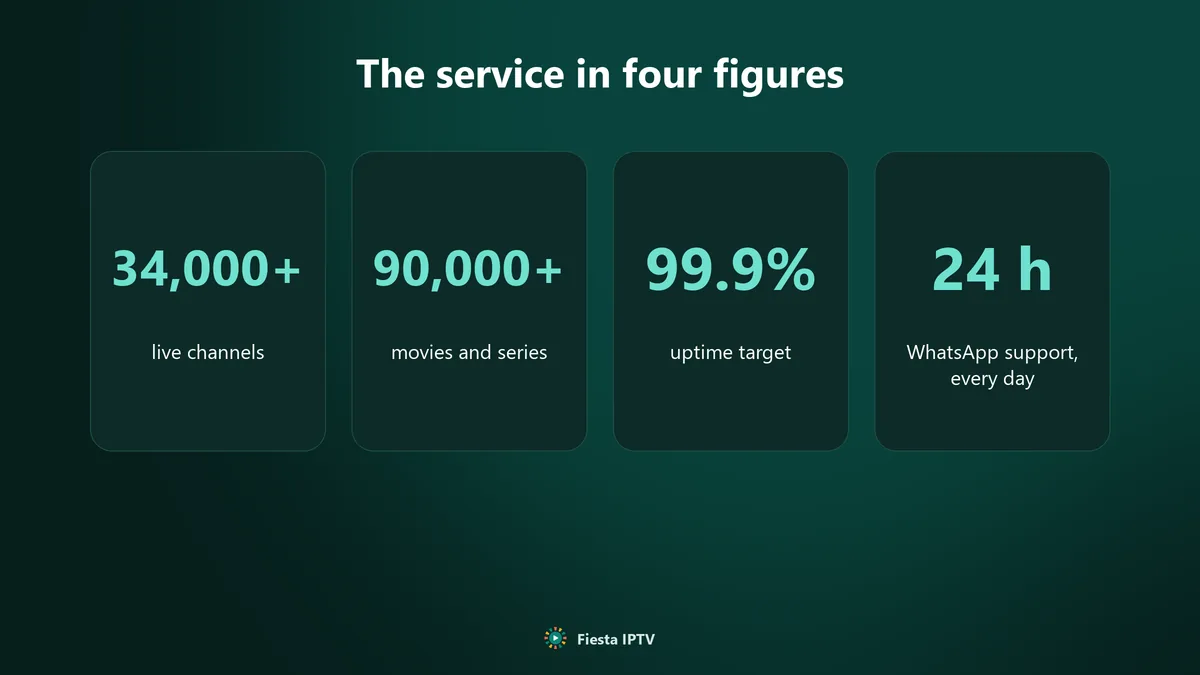
- Live channels: more than 34,000 with Fiesta IPTV, grouped by country and by theme.
- On demand: more than 90,000 movies and series, including complete seasons, with new titles added every day.
- TV guide (EPG): what is on now and next on the live channels.
- Catch-up: pause live TV or rewind to a moment you missed.
- A way to play it: the iBO Player app at no extra cost, or an M3U link or Xtream Codes login for another player.
- Support: in English and Spanish, on WhatsApp, 24 hours a day, every day.
None of this arrives in a box. The IPTV service lives on the provider’s servers, and your TV, stick or phone simply connects to them over your internet. That is why two homes on the same plan can have a different experience: the service is the same, but the Wi-Fi, the device and the room are not.
The same service on every plan
With Fiesta IPTV, the length of the plan and the number of screens change the price, not the content. A 1-month plan opens the same channels, library, TV guide and support as a 24-month plan.
Your first day with the service
Your first day sets the baseline you will judge everything against. Login details arrive within minutes of the payment being confirmed, and setup on the device takes about five minutes.
- Restart the app after the line is confirmed, so the channel list and the TV guide load in full.
- Let the TV guide fill in: give it a moment on the first launch before you judge it.
- Open the groups you will use: the United States group and the Spanish-language groups you follow.
- Mark your favorites: a short list of your own channels saves scrolling every evening.
- Play one channel in 4K and one in HD on the main TV, so you know what each looks like on your screen.
Device steps differ, so they have their own page: the installation guide, which covers Firestick, Smart TV, Android and iPhone or iPad. If you would rather be walked through it, guided setup on WhatsApp takes under ten minutes.
Live channels in an IPTV service
A large channel list is only useful if you can find your own channels in seconds. In a well-run IPTV service, channels are grouped so that you open one country or one theme, not the whole list.
The Fiesta IPTV list has a United States group with local and national channels, Canada in its own group, and large Spanish-language groups for Mexico, Spain, Argentina, Colombia, Chile, Peru, the Caribbean and Central America, including the Dominican Republic and Puerto Rico. Brazil, the United Kingdom, France, Italy, Germany, India, Arabic channels and many more have their own groups too.
Sports by competition
Sports channels carry the NFL, NBA, MLB, NHL, MLS and college football, plus Liga MX, the Premier League, the Champions League, LaLiga, Serie A and Copa Libertadores, along with Formula 1, UFC, boxing, tennis and golf. Pay-per-view events have their own category, so you do not have to hunt for them on the night.
What to check: open the channel list, then confirm during a trial that your local channels and your teams are there and play. A channel that is listed but does not open is worth reporting to support straight away.
Movies and series on demand
The on-demand library is the part of the service you use when nothing live appeals. With Fiesta IPTV it holds more than 90,000 movies and series, including complete seasons, and new titles are added every day.
Most titles have English audio or subtitles, and many have Spanish audio or subtitles, which matters in a bilingual household where one person wants the original and another wants it in Spanish. Check the audio and subtitle options on a title you know before you rely on them for movie night.
What good on-demand looks like
- A title starts after a short load and does not stop to buffer on a steady connection.
- Series are complete and in order, season by season.
- Skipping forward and back works without the stream restarting from the beginning.
- Audio and subtitle choices are visible in the player.
TV guide and catch-up in an IPTV service
The TV guide and catch-up turn a long list of streams into something that feels like television. The guide (EPG) shows what is on now and next, and catch-up lets you pause live TV or rewind to a moment you missed.
An empty guide is one of the clearest signs of a weak IPTV service, because without it you have to open each channel to see what it is showing. With Fiesta IPTV, the TV guide and catch-up are included on live channels at no extra cost.
| Feature | What it does | How to test it |
|---|---|---|
| TV guide (EPG) | Shows what is on now and next | Open the guide on your favorite channels |
| Pause live TV | Holds the program while you step away | Pause for a few minutes, then resume |
| Rewind | Goes back to a moment you missed | Rewind a goal or a touchdown and replay it |
| Channel groups | Sorts channels by country and theme | Find your local channels in under a minute |
If the guide looks empty on day one, restart the app first and give it time to load. If it stays empty on a channel you watch, tell support which one.
Picture quality: 4K, Full HD, HD and SD
Picture quality in an IPTV service depends on two things: the version of the channel you pick and the speed your connection can hold. Fiesta IPTV offers 4K on the main sports, movie and entertainment channels, with Full HD, HD and SD versions alongside.
| Version | Speed per screen | When to pick it |
|---|---|---|
| 4K | 25 Mbps | Large 4K TV on a fast, steady line |
| Full HD | 15 Mbps | Main TV on most home connections |
| HD | 10 Mbps | Second TV, tablet or phone |
| SD | Lowest | Weak signal, mobile data or a hotspot |
The speeds are per screen playing at the same time, so add them up for a busy evening. Having several versions of the same channel is a feature, not clutter: if the 4K version stutters on a slower line, switching to Full HD keeps the game watchable.
Judge the picture on the right screen
A 4K channel only looks like 4K on a 4K TV with a connection that keeps up. Test on the screen you will watch most, at the hour you will watch it, rather than on a phone next to the router.
Servers, uptime and stability in an IPTV service
Stability is the provider’s side of an IPTV service: the servers that send the streams and what happens when one of them is busy. Fiesta IPTV aims for 99.9% uptime, with redundant servers and anti-freeze protection, and states it as a target, not a promise.
- Redundant servers: more than one server can deliver a stream, so a single busy or failed server does not take the channel down.
- Anti-freeze protection: measures meant to keep the picture moving when the load rises.
- Uptime target: the share of time the service aims to be available. A target is a goal the provider works toward, not a guarantee.
Why peak hours are the real test
Any service looks fine on a quiet channel at noon. The test is a big live game in the evening, when many viewers press play at the same moment. Watch at that hour during a trial and note whether the picture holds, how long a channel takes to open and whether it recovers by itself after a stutter.
Be wary of any IPTV service that promises zero buffering. No provider controls the Wi-Fi in your home, so that promise cannot be made honestly.
24-hour trial for $2.95, taken off your first subscription.
Screens and devices on one line
A screen is a device playing at the same time, not a device with the app installed. With Fiesta IPTV, plans cover 1, 2 or 3 screens, and a 1-screen plan can be installed on several devices as long as only one plays at a time.
The same line runs on Samsung and LG Smart TVs, Android TV, Google TV, Android boxes, MAG boxes, Amazon Firestick, Apple TV, Nvidia Shield, Xbox, iPhone, iPad, Android phones and tablets, Windows, Mac and a web player. It also works with a VPN and when traveling, wherever there is an internet connection.
Each device has its own steps in the installation guide. If a second screen starts and the first one stops, the plan has fewer screens than the household is using at once; the fix is more screens at renewal, not a new device.
iBO Player, M3U link or Xtream Codes
The player is the part of the IPTV service you touch every day. Fiesta IPTV supplies iBO Player at no extra cost, and also gives the line as an M3U link or an Xtream Codes login for players such as IPTV Smarters or TiviMate.
| Option | What you receive | Best for |
|---|---|---|
| iBO Player | The app, linked to your device | Smart TVs, Firestick and first-time viewers |
| Xtream Codes login | Server, username and password | IPTV Smarters, TiviMate and similar players |
| M3U link | A single playlist address | Players that load a playlist file |
The channels and library are the same whichever you choose. If a problem only appears in a third-party player, try the same channel in iBO Player before reporting it: that tells support whether the issue is in the stream or in the app.
Support: what to expect from an IPTV service
Support is the part of an IPTV service you notice only when you need it, for example in the middle of a game. Fiesta IPTV answers in English and Spanish on WhatsApp, 24 hours a day, every day, and by email at support@fiesta-iptv.com.
What to send so the fix is quick
- The device you are watching on and the app (iBO Player or another player).
- The channel or title, and the time the problem happened.
- What you see: a black screen, a freeze, no sound, or a guide that will not load.
- Whether other channels work, and whether the problem is the same next to the router.
A short message with those four points lets a technician tell straight away whether the fault is on the service side or in your home. Support also handles device changes, extra screens and questions about the refund policy.
English or Spanish, 24 hours a day, every day.
Home side or service side: a quick fault-finder
Before you blame the IPTV service, find out where the problem starts. A few quick checks separate faults in your home from faults on the provider’s side.
| What you see | Likely side | First thing to try |
|---|---|---|
| Fine next to the router, poor upstairs | Your Wi-Fi | Ethernet cable, powerline adapter or a mesh point near the TV |
| Every channel stutters at once | Your connection | Check your speed; switch to Full HD or HD |
| One channel fails, others play | Service side | Report the channel and the time to support |
| Works in iBO Player, not in another app | The other player | Use iBO Player or reload the playlist |
| Second screen stops the first | Plan size | Add a screen at renewal |
| Guide empty after setup | App not fully loaded | Restart the app and wait for the guide |
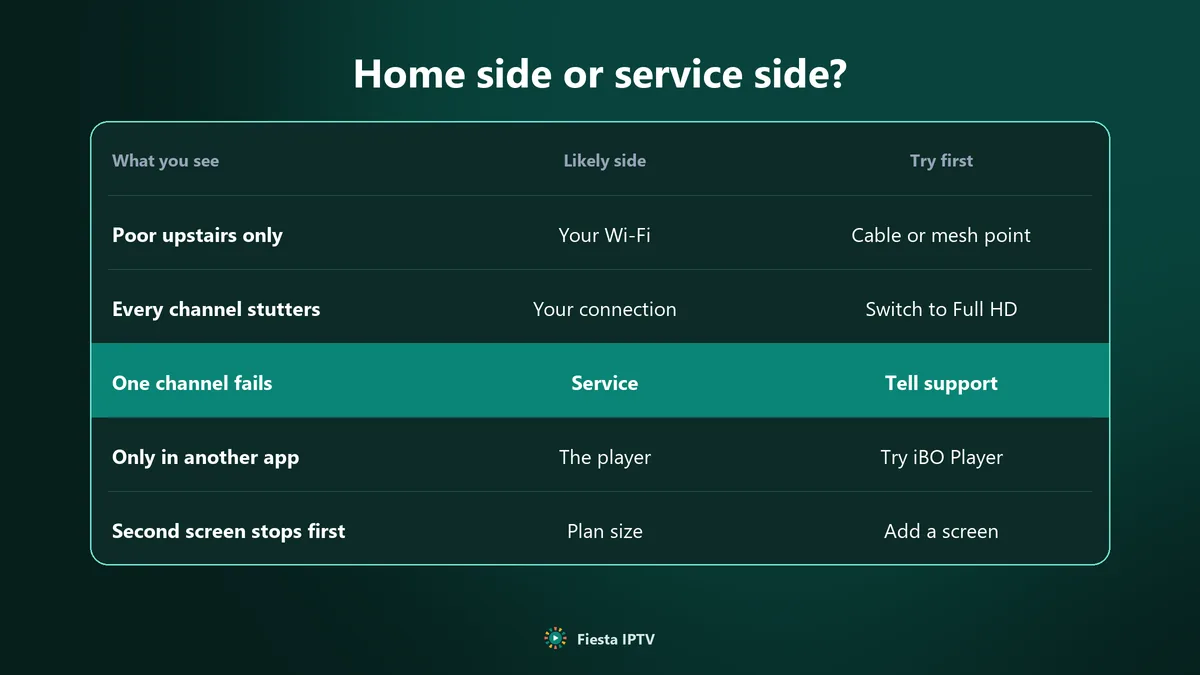
Wi-Fi weakens through walls and floors, so a basement or back bedroom can get a much weaker signal than the living room. If the picture is fine next to the router, fix the signal in that room before you change providers.
How to judge IPTV service quality: a one-week scorecard
The fairest way to judge an IPTV service is a week of normal viewing, scored on the same points every day. A single evening can be lucky or unlucky; a week shows the pattern.
| What to score | Good sign | Poor sign |
|---|---|---|
| Peak-hour stability | Picture holds through an evening game | Freezes at kickoff, every time |
| Channel start | Channels open quickly and the same way each time | Long waits or black screens |
| Your own channels | Local channels and your teams play | Listed but will not open |
| TV guide | Filled in on the channels you watch | Empty or out of step |
| Catch-up | Pause and rewind work on live channels | Missing or restarts the stream |
| Support | A useful reply in the evening | No answer, or the same canned reply |
| Recovery | A stutter clears by itself | You must restart the app each time |
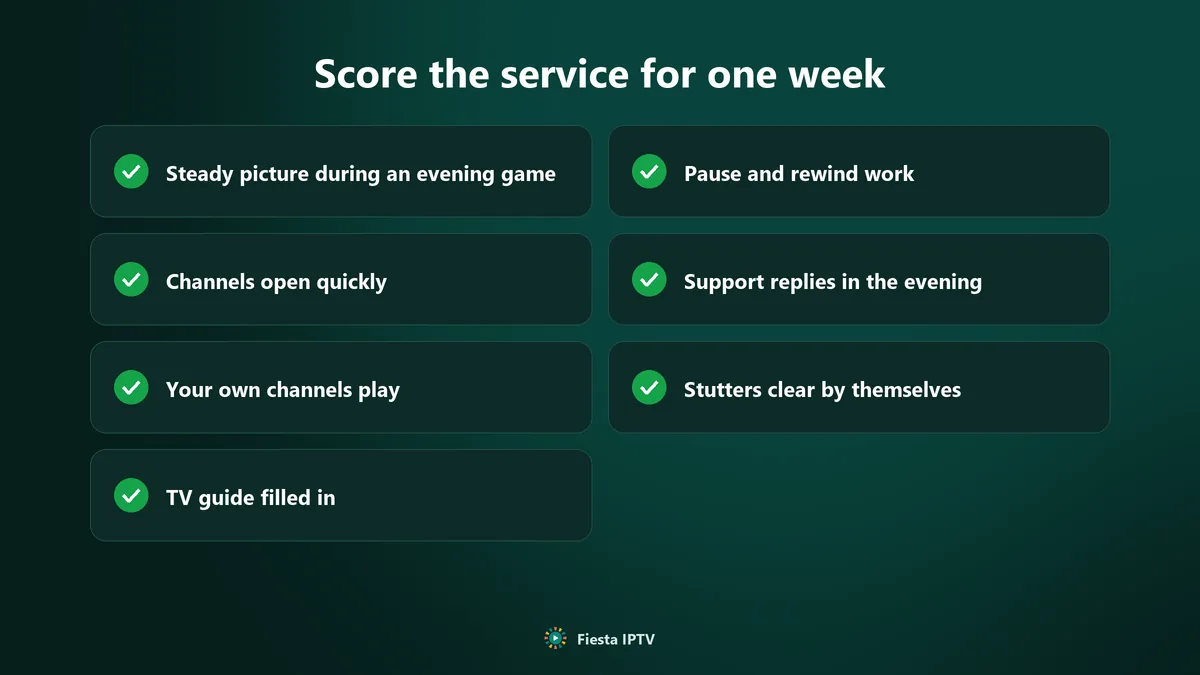
Score your home side too. If the main TV is on Wi-Fi far from the router, note it, because it will color every result. The guide to the best IPTV for your home turns these points into a side-by-side test method if you are still choosing.
Renewals and the end of an IPTV service period
An IPTV service period ends on its expiration date, and with Fiesta IPTV nothing more is charged because there is no automatic renewal and no contract. There is nothing to cancel.
- Same login: on renewal the login details stay the same, so no device has to be set up again.
- Change the plan: you can pick a different length or a different number of screens when you renew.
- Keep your proof of payment: it helps when you renew, change devices or contact support.
- Renew before a big event: card, PayPal and Revolut are confirmed immediately, while bank transfer and crypto take 2 to 3 hours.
Renewal is also the moment to use your scorecard. If the week went well, a longer plan brings the monthly cost down, to $6.42 a month on 12 months or $4.96 a month on 24 months for one screen. The full price list is on the pricing section.
Note that the 7-day refund applies to a first subscription, not to renewals, which is one more reason to test the service properly before committing to a long period.
1 to 24 months, 1, 2 or 3 screens.
What an IPTV service does not include
An IPTV service covers the line, the app, the TV guide, catch-up and support. It does not include your internet service, your Wi-Fi equipment or your devices, which stay your own.
Fiesta IPTV is an independent service, not connected to any TV channel, network, cable or satellite operator or streaming platform. The points on rights and on what a subscription does not cover are set out once, in the IPTV subscription guide.
If you would like to sell the service rather than watch it, the reseller page explains how that works, and the terms of service set out the conditions in writing.
How this guide was written
This guide was prepared for Fiesta IPTV with the help of AI writing tools. Its prices, trial terms, refund conditions, device steps and speed figures are the ones published on this site. If you spot something that looks out of date, tell us through the contact page.
Frequently asked questions
- What does an IPTV service include after you subscribe?
- Fiesta IPTV includes more than 34,000 live channels, more than 90,000 movies and series, a TV guide (EPG), catch-up, the iBO Player app or an M3U link or Xtream Codes login, and support in English and Spanish on WhatsApp, 24 hours a day.
- How stable is the Fiesta IPTV service?
- Fiesta IPTV aims for 99.9% uptime, with redundant servers and anti-freeze protection, and states it as a target rather than a promise. Stability at home also depends on your own connection, so test during an evening game on the TV you use most.
- Does Fiesta IPTV have a TV guide and catch-up?
- Yes. Fiesta IPTV includes a TV guide (EPG) showing what is on now and next, and catch-up on live channels, so you can pause live TV or rewind to a moment you missed. Both come with every plan at no extra cost.
- What internet speed does Fiesta IPTV need?
- Fiesta IPTV needs 10 Mbps for HD, 15 Mbps for Full HD and 25 Mbps for 4K, for each screen playing at the same time. An Ethernet cable, a powerline adapter or a mesh point near the main TV gives a steadier picture than weak Wi-Fi.
- How do I contact Fiesta IPTV support?
- Fiesta IPTV support answers on WhatsApp in English and Spanish, 24 hours a day, every day, and by email at support@fiesta-iptv.com. Send your device, the channel, the time and what you see, so a technician can find the cause quickly.
- Does the Fiesta IPTV service renew automatically?
- No. Fiesta IPTV has no automatic renewal and no contract. Access stops on the expiration date, and if you renew, your login details stay the same, so nothing has to be set up again on your devices.